
Indeed ATS Integrations for Easier Hiring
Streamline hiring with Indeed ATS Integrations. Discover seamless recruitment software and hiring solutions with Business Draft, an Indeed Platinum Partner.

Published in
Partnerships •
Oct 09, 2026 • 8 mins read
What Are Indeed ATS Integrations?
An Indeed ATS integration links Indeed to an applicant tracking system (ATS). It lets employers post jobs, collect applications, and manage candidates without jumping between tools.
For talent acquisition teams that rely on Indeed, the right recruitment software can save time and reduce busywork.
Not all Indeed ATS integrations are equal.
Some hiring platforms only move applications from Indeed into their software. Others offer deeper links that support job sync, screening questions, sponsored job management, and more hiring workflows.
Business Draft is an Indeed Platinum Partner. It connects Indeed recruiting tools with a full hiring platform.
From job posts and applicant review to interviews, offers, and onboarding, Business Draft keeps the hiring flow in one place.
Because you have a business to run. Your hiring software should not take more of your time.
Business Draft and Indeed: A Platinum Partnership
Business Draft's relationship with Indeed goes beyond a basic applicant tracking integration.
As an Indeed Platinum Partner, Business Draft has built a connected experience for franchise owners, multi-location teams, and growing businesses.
Employers can create job opportunities in Business Draft, sync them with Indeed, receive applications automatically, and manage candidates without manual data entry.
The integration supports several key capabilities:
- Indeed Job Sync: Publish and sync eligible job opportunities with Indeed.
- Indeed Apply: Let candidates apply through Indeed while their details transfer into Business Draft.
- Screening Questions: Collect key candidate details during the application process.
- Sponsored Jobs: Use Indeed sponsorship tools through Business Draft.
- Applicant Management: Review resumes, talk with candidates, and track hiring progress.
- Hiring Automation: Schedule interviews, send reminders, extend offers, and manage onboarding.
Instead of separate recruiting workflows, employers can manage more of hiring in one connected platform.
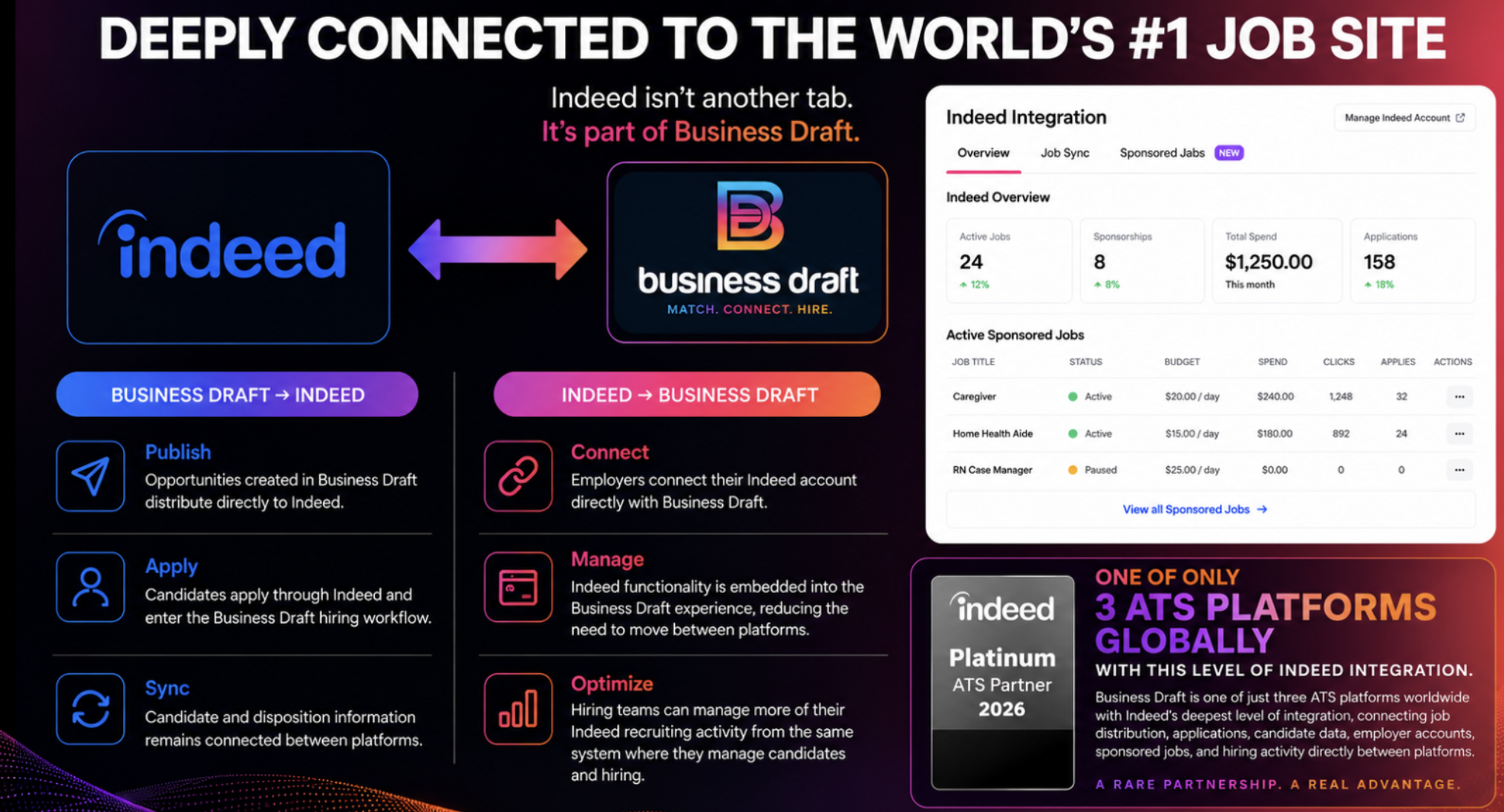
Indeed + Business Draft: A powerful integration that connects job postings, applicant tracking, and hiring automation in one seamless experience. From application to onboarding, hiring just got easier.
How Does Business Draft's Indeed Integration Work?
Business Draft's Indeed integration is designed to cut repetitive admin work while keeping employers in control.
1. Connect Your Indeed Employer Account
Employers connect their Indeed Employer account through Business Draft.
Once connected, eligible job opportunities created in Business Draft can sync with Indeed.
2. Create and Publish Jobs
Employers create opportunities directly in Business Draft, including job descriptions, locations, requirements, and screening questions.
Business Draft then sends the supported job information to Indeed.
This removes the need to rebuild the same posting across multiple systems.
3. Candidates Apply Through Indeed
Candidates find opportunities on Indeed and submit applications through the supported Indeed Apply experience.
This helps reduce extra redirects and repeated steps.
4. Applications Enter Business Draft
When someone applies, their available application data transfers into Business Draft.
This can include resumes, contact details, work history, screening responses, and other details provided through Indeed.
Employers can start reviewing candidates right away, without manual downloads or imports.
5. Manage Hiring in One Platform
Once candidates arrive in Business Draft, employers can message applicants, review details, schedule interviews, send offers, and complete onboarding tasks.
Indeed helps you reach candidates. Business Draft helps you turn them into hires.
One important distinction: Jobs created separately inside Indeed do not automatically transfer into Business Draft. Employers should create and manage connected job opportunities through Business Draft.
Why Indeed Apply Integration Matters
Every extra step in an application process gives a candidate one more chance to leave.
Picture someone finding a job on Indeed, clicking Apply, and landing on another website.
They are then asked to create an account, enter their details again, and upload a resume they already shared.
At some point, applying for the job starts to feel like the job itself.
Indeed Apply makes this easier by letting candidates submit applications through Indeed.
According to Indeed's published research, employers using Indeed Apply have seen better completion rates than with more complex application paths.
For employers hiring caregivers, healthcare professionals, retail associates, service workers, and other frontline workers, reducing application friction can be especially useful.
Business Draft supports Indeed Apply while still letting employers manage candidates through its applicant tracking system.
Less friction for candidates. Less work for employers.
Can Employers Sponsor Indeed Jobs Through Business Draft?
Yes. Business Draft supports Indeed Sponsored Jobs through its Indeed integration.
After connecting and authorizing their Indeed Employer account, employers can access supported sponsorship tools inside Business Draft.
Sponsored Jobs can help increase visibility and attract more candidates.
But sponsorship does not guarantee a set number of applicants or hires.
Job results depend on several factors, including location, pay, competition, job fit, candidate demand, and sponsorship.
That is why Business Draft encourages employers to think about the full recruiting experience.
A clear job title, fair pay, accurate description, and simple application process all support a stronger recruiting strategy.
Why Franchise Businesses Choose Business Draft
Franchise hiring comes with challenges that traditional recruitment software does not always solve.
Single-location owners need an easy way to hire.
Multi-location operators need consistency.
Franchise leadership needs visibility into recruiting across the organization.
Business Draft was built with those needs in mind.
Today, Business Draft supports more than 100 franchise brands and over 10,000 franchise users.
Its franchise-first approach gives individual owners a simple hiring experience while giving larger organizations the tools to manage recruiting across many locations.
Business Draft helps franchise teams keep workflows consistent, manage location-based hiring, and simplify recruiting for owners with limited hiring experience.
The platform links job ads with tools used by franchise businesses, supported by Indeed Platinum Partnership.
FRANCHISING GETS COMPLICATED.
Hiring does not have to.
What Makes Business Draft Different From Other Indeed ATS Partners?
Indeed works with many applicant tracking systems, but each integration offers different features.
Business Draft combines Indeed connection with a broader hiring platform.
Employers get access to applicant tracking, AI-powered matching, automated communication, interview scheduling, video interviews, digital offers, and onboarding tools.
Business Draft also provides U.S.-based customer support to help employers work through hiring challenges.
And unlike software providers that hide key features behind expensive subscription tiers, Business Draft uses straightforward pricing and gives access to its core hiring tools.
ONE PLATFORM. ONE PRICE.
Premium features without the premium tier.
Frequently Asked Questions About Indeed ATS Integrations
What is the best ATS for Indeed?
The best ATS for Indeed depends on an employer's hiring needs, recruiting volume, and required features. Business Draft is an Indeed Platinum Partner that offers job sync, Indeed Apply, applicant tracking, sponsored job management, and hiring automation. Its franchise-first design makes it a strong fit for franchise owners and multi-location businesses.
Does Business Draft integrate directly with Indeed?
Yes. Business Draft is an Indeed Platinum Partner and supports direct integration with Indeed. Employers can sync eligible job postings, receive candidate applications automatically, and use supported Indeed recruiting features through Business Draft.
Do Indeed applicants automatically appear in Business Draft?
Yes. When candidates apply to eligible jobs synced through Business Draft's Indeed integration, their available application data transfers into Business Draft. Jobs created separately inside Indeed do not automatically sync into Business Draft.
Can I post jobs to Indeed from Business Draft?
Yes. Employers can create job opportunities in Business Draft and sync eligible postings with their connected Indeed Employer account. This cuts duplicate job entry and helps keep recruiting workflows organized.
Does Business Draft support Indeed Apply?
Yes. Business Draft supports Indeed Apply, letting candidates submit applications through Indeed while their details transfer into Business Draft for review and hiring management.
Can I sponsor Indeed jobs through Business Draft?
Yes. Business Draft supports Indeed Sponsored Jobs. Employers must connect and authorize the right Indeed Employer account to use the supported sponsorship tools.
Is Business Draft an Indeed Platinum Partner?
Yes. Business Draft is an Indeed Platinum Partner. Its integration connects Indeed recruiting tools with Business Draft's applicant tracking and hiring automation features.
Does Business Draft work for franchise businesses?
Yes. Business Draft is a franchise-first hiring platform that supports more than 100 franchise brands and 10,000 franchise users. It gives recruiting tools to single owners, multi-location operators, and franchise organizations.
Does Business Draft include interview scheduling?
Yes. Business Draft includes candidate self-scheduling, Google Calendar and Microsoft 365 integration, automated interview reminders, and video interviewing tools.
Does Business Draft include onboarding?
Yes. Business Draft supports digital offer letters, electronic signatures, and onboarding documents, helping employers move from applicant to new hire.
Is Business Draft an alternative to CareerPlug?
Yes. Business Draft is an alternative to CareerPlug for businesses that want applicant tracking, Indeed integration, hiring automation, and franchise-focused recruiting tools. Employers should compare each platform's current features, pricing, and support to see what fits best.
Does Business Draft charge extra for premium hiring features?
Business Draft follows a One Platform. One Price. approach, so its core hiring features do not require separate premium tiers. Third-party charges, such as Indeed advertising costs, are still separate.
Business Draft Does More. Because You Have a Business to Run.
Business Draft combines Indeed recruiting tools with applicant tracking, candidate communication, interview scheduling, digital offers, and onboarding.
The Platinum Partnership connects job ads with tools to help businesses hire candidates more efficiently.
And its franchise-first design makes those tools available to individual owners and growing organizations.
ONE PLATFORM. ONE PRICE.
About the Author
Ty Peck | CEO & Co-Founder, Business Draft
Ty Peck is the CEO of Business Draft, an Indeed Platinum Partner, helping 100+ franchise brands and 10,000 users.
Ty and his team works directly with franchise owners, business leaders, and multi-location organizations to understand recruiting challenges and build practical hiring solutions.
His background includes applicant tracking systems, Indeed integrations, recruitment automation, AI-powered candidate matching, franchise hiring operations, and hiring technology development.
Through Business Draft, Ty and his team focus on helping employers simplify recruiting, reduce admin work, and create better hiring experiences.
Q&A
Question: Why should employers create connected job opportunities inside Business Draft instead of directly in Indeed?
Short answer: Creating jobs in Business Draft lets eligible postings sync with Indeed while keeping applicant tracking, screening questions, candidate communication, interview scheduling, offers, and onboarding in one place. Jobs created separately inside Indeed do not automatically transfer into Business Draft, so starting in Business Draft helps employers avoid broken workflows and manual data entry.
Question: Does the Indeed integration replace the need for a hiring process after applications arrive?
Short answer: No. The integration helps employers reach candidates and receive applications more efficiently, but Business Draft is built to manage what happens next. Employers can use Business Draft for AI matching, applicant review, communication, scheduling interviews, video interviews, offers, and onboarding after candidates apply.
Question: What kinds of businesses benefit most from Business Draft's Indeed integration?
Short answer: The integration is especially useful for franchise owners, multi-location operators, growing businesses, and employers hiring frontline workers such as caregivers, healthcare professionals, retail associates, and service staff. These teams often need faster application flow, steady workflows, less admin work, and better visibility across locations.
Question: Does sponsoring a job through Business Draft guarantee more hires?
Short answer: No. Sponsored Jobs can increase visibility and may help attract more candidates, but they do not guarantee a set number of applicants or hires. Job results also depend on location, pay, competition, job fit, candidate demand, and the quality of the application experience.
 LinkedIn
 Facebook
 Twitter
 E-Mail